AI SOLUTIONS
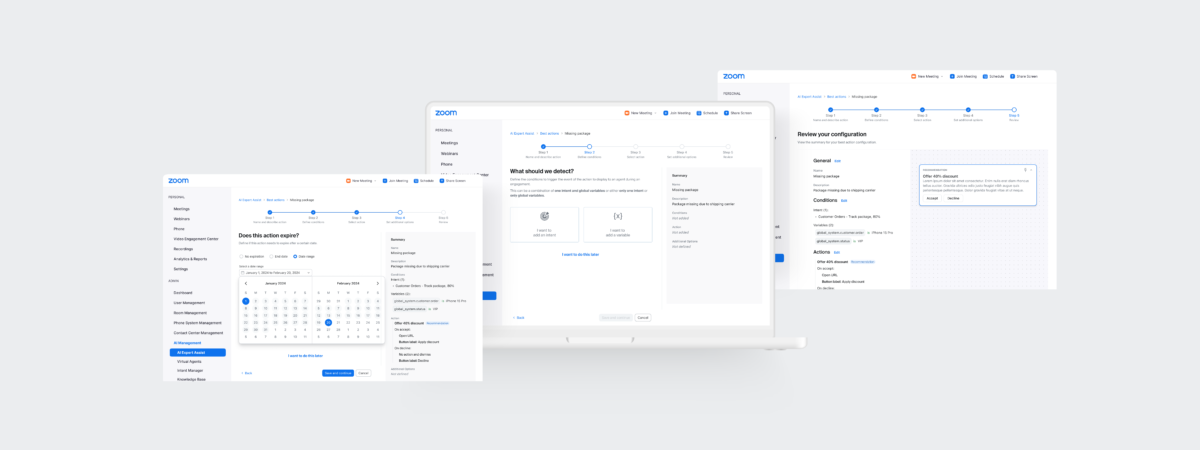
AI Companion was offered by Zoom in September 2023. Quickly, Zoom Contact Center launched its own set of features with AI Expert Assist.
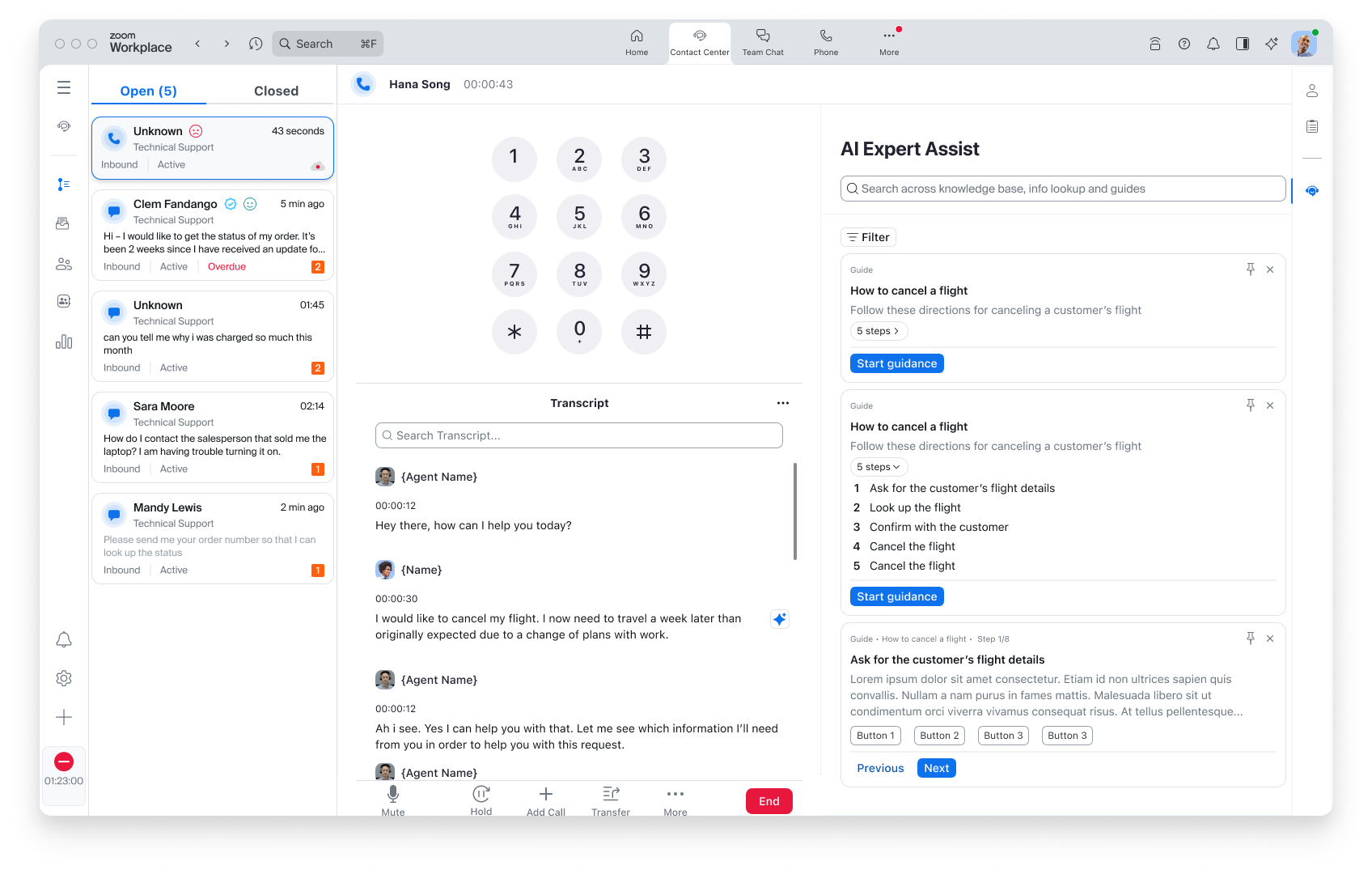
When agents are in an engagement, we provided real-time assistance to help relieve the cognitive load that comes with the role.
ROLE
Lead Product Designer
DURATION
6 months
TEAM
2 Designers, 2 Product Managers,
6 Engineers
PROJECT OVERVIEW
Contact center agents manage complex customer needs, often across multiple systems, while being expected to resolve issues quickly and accurately. This multitasking creates high mental load and contributes to stress, errors, and burnout.
How might we leverage AI to assist agents in real-time, without overwhelming or distracting them?
DESIGN CHALLENGES
- Balancing visibility of AI suggestions without cluttering the agent UI
- Ensuring accuracy and relevance in recommendations without over-promising capabilities
- Building trust in early-stage AI while giving agents control
GOALS
- Reduce agent cognitive load by surfacing relevant, timely insights
- Improve resolution time and agent satisfaction
- Deliver assistive AI in a way that feels supportive, not intrusive
- Strengthen adoption of Zoom’s broader AI strategy within the contact center
USER RESEARCH
Since AI-assisted agent workflows were a new area for Zoom Contact Center, we began with extensive user research to ground our strategy in real-world needs.
AGENT INSIGHTS
We conducted interviews , and usability tests with contact center agents to understand:
- How they prefer to receive information during live engagements
- Pain points in switching between systems or manually searching for resources
- Expectations around timing, accuracy, and control when working with AI suggestions
This helped us define the delivery strategy for features like intent detection, knowledge surfacing, and action recommendations — ensuring the assistance would feel timely, relevant, and unobtrusive.
We also explored different AI engine capabilities and limitations, which informed the design constraints and prioritization for what should be surfaced, how it should appear, and when it should trigger.
SUPERVISOR INSIGHTS
As we solidified the agent experience, we expanded our focus to supervisors — the next key persona in the workflow.
We sought to understand:
- What real-time signals or insights would help supervisors stay ahead of issues
- How to help them identify and resolve escalations early
- What information would boost their efficiency and coaching effectiveness
These findings helped us begin shaping future supervisor-facing AI tools, ensuring alignment between agent support and broader operational oversight.
AGENT WORKFLOW IMMERSION
We ran interviews and observation sessions with agents handling real-time chats, calls, and tickets. These sessions uncovered:
- Frequent context switching across systems to find answers or follow policy
- Uncertainty about what to say or do next, especially during high-stress customer conversations
-
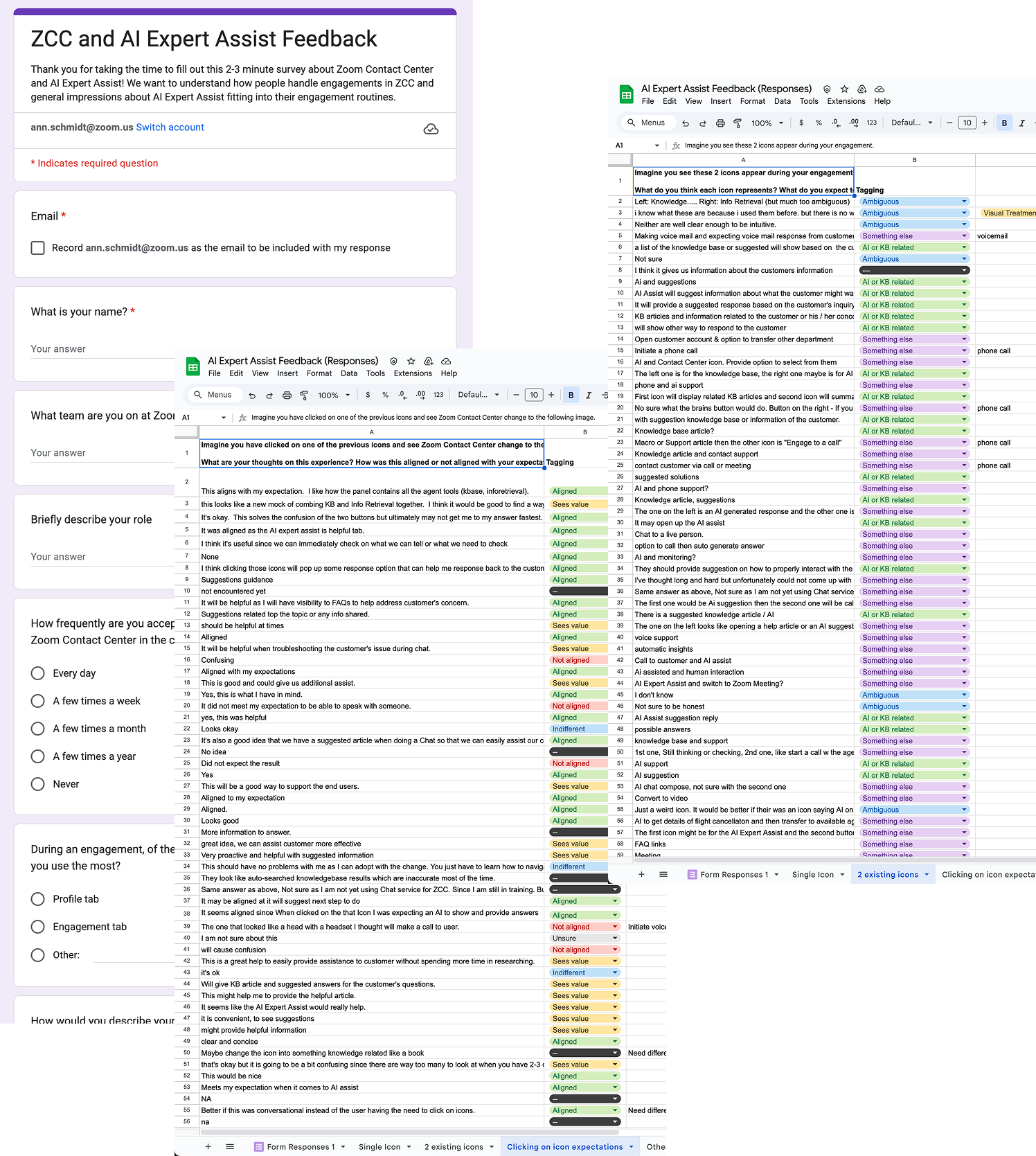
71% aligned with what they expected when clicking on the AI icon to reveal AI assistance
- Leveraging our response assistant with AI for efficiency
- Desire for an automated experience
A desire for tools that support, not replace — agents didn’t want to be told what to do, but appreciated suggestions they could choose to use:
- AI should be helpful, not pushy
- Timing is critical to avoid cognitive load
- Allow agents to have control of interactions without friction
TESTING DELIVERY METHODS
We explored several ways to present AI assistance, including:
- Inline prompts within the conversation panel
- A persistent side panel with smart suggestions
We tested prototypes to evaluate:
- Scannability and prioritization of suggestions
- Trust and transparency in AI-sourced content
- Agent control — could they accept, edit, or ignore suggestions?
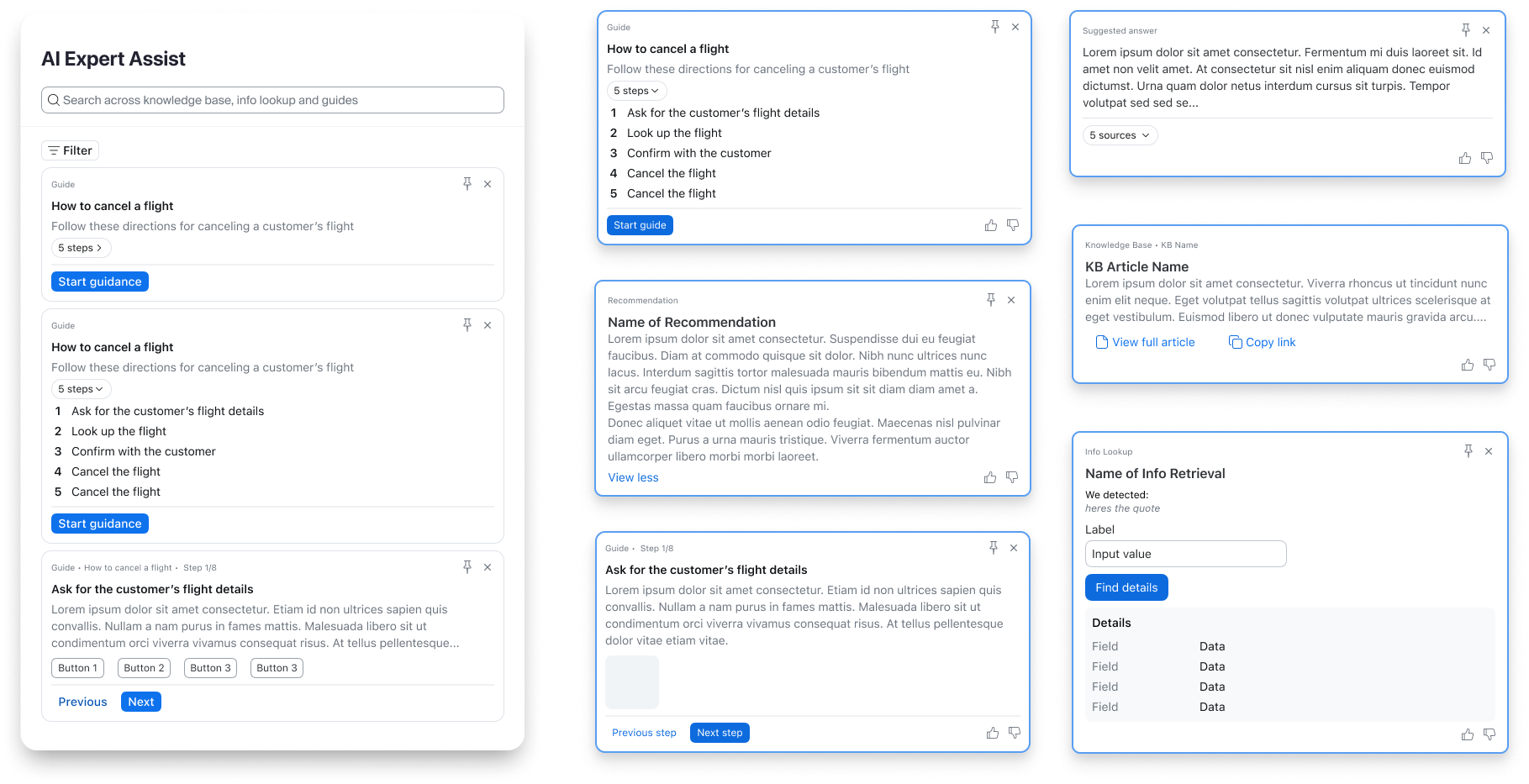
These tests informed our final design approach: a clean, docked side panel that surfaces high-value insights without disrupting the flow of conversation.
UNDERSTANDING OF AI EXPECTATIONS
As this was one of our first generative AI offerings, we also needed to shape user expectations:
- What is the AI good at (e.g., surfacing KB articles)?
- What should agents still rely on human judgment for?
- How can we communicate confidence levels or uncertainty?
We added lightweight explainability cues, such as:
- Iconography for quick recognition
- Highlighting source links (e.g., Knowledge Base articles)
- Indicators when content is AI-generated vs. retrieved
EXPANDING TO SUPERVISORS
Once we had a strong foundation for agent support, we turned our attention to supervisors.
We ran discovery interviews to learn:
- How supervisors currently track active engagements
- What signals help them detect when agents are struggling
- How they handle escalations, coaching, and QA follow-up
Key takeaways included:
- Supervisors need real-time visibility into risky or off-script moments
- They want to intervene before things escalate, not just react afterward
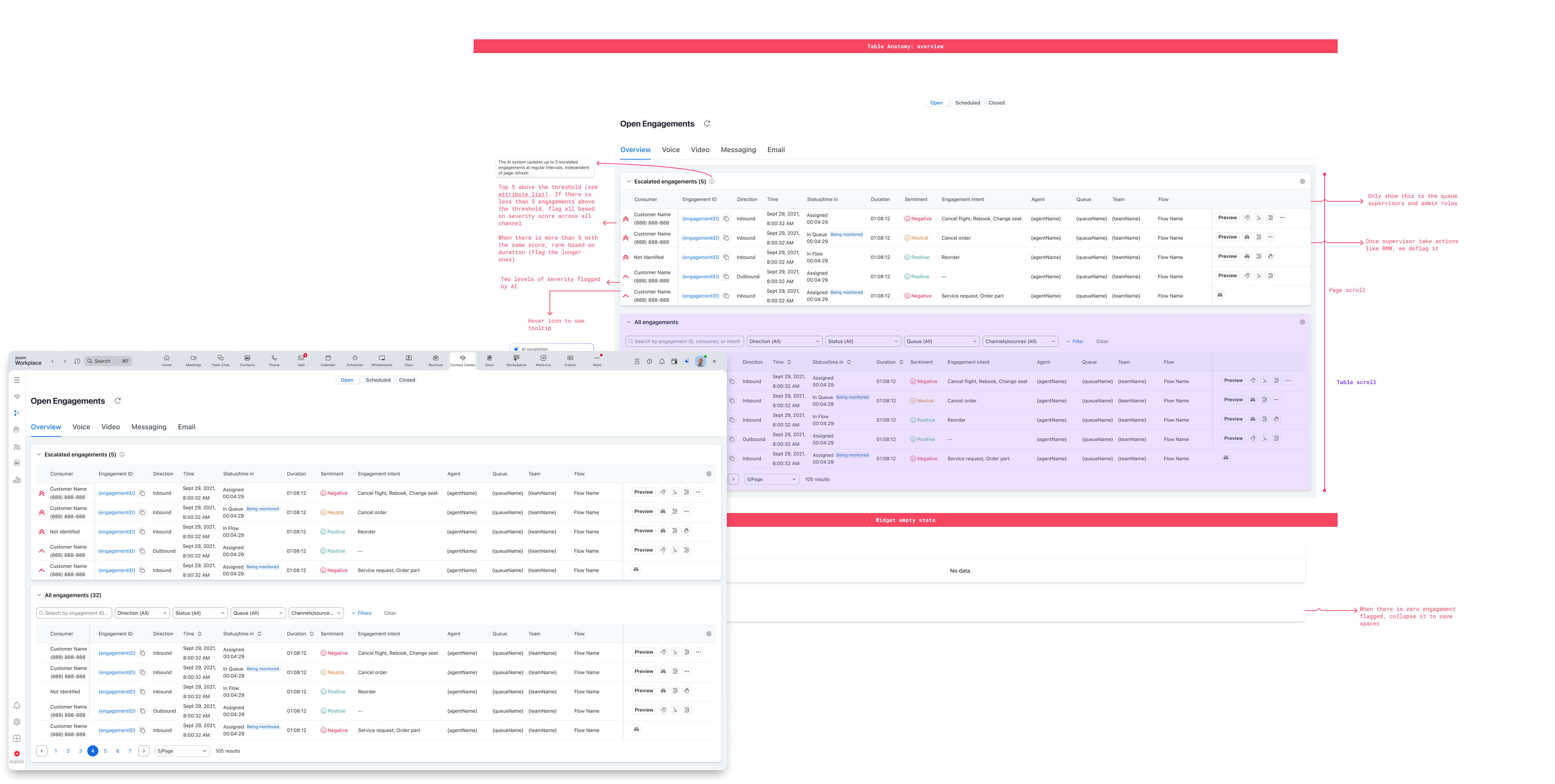
- A real-time dashboard of engagement health would be a valuable next step
Below is a screen that surfaces flagged engagements that a supervisor can address without needing the agent to reach out for help.
FUTURE OPPORTUNITIES
Based on our research, we identified future-facing opportunities:
- Smart alerts when AI detects high-friction or negative sentiment engagements
- Supervisor-facing summaries of key engagement trends or agent behaviors
- AI-assisted coaching tools that help supervisors give better feedback based on patterns
OUTCOME
- Launched AI Expert Assist in tandem with Zoom’s broader AI Companion initiative
- Strong internal adoption among support teams with early feedback highlighting reduced effort in searching for answers
- Helped position Zoom Contact Center as a forward-looking, AI-integrated solution in a competitive market
KEY LEARNINGS
Agent-Focused
- AI must support, not direct — agents wanted optional assistance
- Timing matters — poorly timed suggestions created friction despite accuracy
- Transparency builds trust — labeled suggestions performed better
- Strong user understanding is essential for AI to help, not just impress
Supervisor-Focused
- Need actionable visibility — real-time risk signals, not more data
- Early intervention beats reaction — AI indicators helped prevent escalations
- Role-specific design required — supervisor and agent needs were different
TAKEAWAYS
-
Design for assist, not automation — enhance decisions, don’t control them
- Right info, right moment — timing and prioritization equal accuracy
- Be transparent — clear AI labeling builds trust
- Focus the MVP — start small, prove value, iterate
- Tailor to role — avoid one-size-fits-all UX
- Anticipate, don’t react — surface trends early to prevent problems